Section 1.1 HW1

Exercises Exercises

1.

    Welcome to ActiveCode coding problems in Runestone! Here’s an image of a typical coding problem:
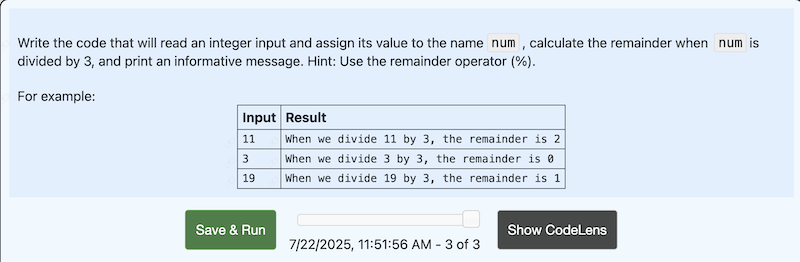
    1. The first thing you should do when starting a problem is to carefully read the problem description. The problem description tells you what your solution code needs to accomplish, as well as important details about the problem including:
      • Type of input your code must handle
      • Type of output your code will need to produce
      • Whether your code should produce output (print) or a value (return)
      • If you don’t understand the problem, you won’t be able to solve the problem; this is the most important step!
    2. To help you understand the problem, you will always be given a few examples. Typically, the examples show sample inputs and the result that your code should produce for each input. It’s important to understand that your solution needs to be general. This means that your goal is to code a solution that will work for any valid input for the problem, not just the given examples.
    3. Once you understand the problem, you can start coding your solution in the white box. Depending on the problem, there may be some code already there to get you started. When you are ready to check your solution, click the β€œSave & Run” button.
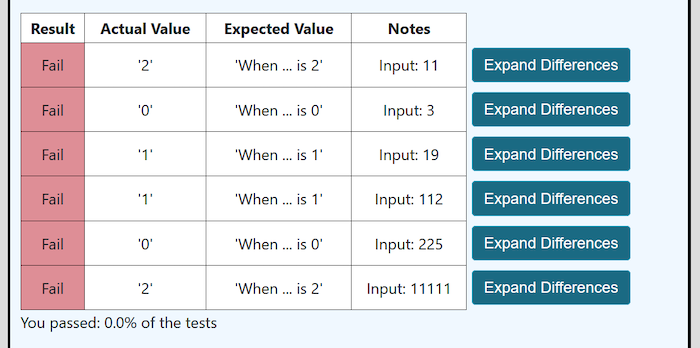
      If I were to click the β€œSave & Run” button for the example problem in the image above, here is the feedback that I would get from Runestone:
      For each example input, Runestone shows you the correct (Expected Value) result, the result produced by your code (Actual Value), and whether your result is correct (Result). If the expected value or actual value is too long to be fully shown in the results table, clicking on the β€œExpand Differences” button will show that information in a popup window.
    4. Use the Runestone feedback to try to understand where the problems are in your code, then work on fixing your code. Keep checking and revising until you reach the correct solution.
    Now it is time for you to try solving some ActiveCode problems in Runestone! Select the answer "True" and click the "Check Me" button before moving on.

  • True.

  • False.

2. Output the Input.

Complete the program below by adding a line of code that will output a message reporting back what is input by the user.
Note: The first line of the program for getting input from the user is provided. Do not change this line.
For example:
Input Result
Howdy!
user input: Howdy!
Muddled marmots!
user input: Muddled marmots!
3.14
user input: 3.14

3. Say Hello.

Write a short program to get a name from the user, then output a message saying "hello" to the user by name.
Note: In ALL of your ActiveCode solutions, use the input function with no arguments. For example, in this problem, your first line of code might be: name = input()
As an experiment, see what happens when you use: name = input("Tell me your name: ")and then CHECK your answer.
For example:
Input Result
everyone
Hello everyone
coder-in-training
Hello coder-in-training
Ziggy
Hello Ziggy

4. Add 8.

Write a program to get an integer value from standard input, add 8to the input value, then output the result.
Note: The first line of the program, for getting input from the user, is provided.
For example:
Input Result
5 + 8 = 13
-7 + 8 = 1
0 + 8 = 8

5. Multiply by 123.

Write a short program that will read a decimal value (a float) from standard input, multiply the input value by 123, then output a message with the result.
For example:
Input Result
5.5
5.5 * 123 = 676.5
-8.1
-8.1 * 123 = -996.3
2.2
2.2 * 123 = 270.6

6. Find the Remainder.

Write the code that will read an integer input and assign its value to the name num, calculate the remainder when numis divided by 3, and print an informative message. Hint: Use the remainder operator (%).
For example:
Input Result
When we divide 11 by 3, the remainder is 2
When we divide 3 by 3, the remainder is 0
When we divide 19 by 3, the remainder is 1

7. Square of Input.

Write the code to read an input, convert it to an integer value, assign that value to the name x, and print a message regarding the square of the input (i.e., \(x^2\)).
For example:
Input Result
When x = 2 then x^2 = 4
When x = 24 then x^2 = 576
-18
When x = -18 then x^2 = 324

8. Volume of Cylinder.

Suppose we want to calculate the volume (in cubic cm) of a cylinder for which the radius of the base is R cm and the height is H cm. We will use the formula: volume = area of base * H. Rather than making a single large calculation and reporting the result, you should practice dividing the work into stages using two assignment statements.
A partial solution is provided, you just need to add a bit more code.
Notice that the statement import math makes all the objects in the math module available; your code should use math.pi (Python’s name for Ο€), in calculating the area of the base.
For example:
Input Result
3
5
141.372
6
2
226.195
2.3
3.5
58.167

9. Convert Minutes.

We need to convert a number of minutes to hours-and-minutes. For example, 83 minutes is equal to 1 hour and 23 minutes.
Write a few lines of code to do the following:
  1. Read an input and convert it to an integer; assign that value to the name total_minutes. (You can assume that the input will have a suitable form for representing a positive integer.)
  2. Use integer division (//) to determine how many full hours can fit into the given number of minutes; assign that value to the name hrs.
  3. Use the remainder operator (%) to determine how many minutes are "left over" after removing as many whole hours as possible; assign that value to the name mins.
  4. Print a message reporting the results of your computation.
For example:
Input Result
314
314 minutes equals 5 hours and 14 minutes
230
230 minutes equals 3 hours and 50 minutes
15 minutes equals 0 hours and 15 minutes
You have attempted of activities on this page.